









































Choosing the right payroll software depends on your business size, budget, accounting system and payroll requirements. Some small businesses need a simple, affordable payroll solution, while others require integrated accounting, HR features, or dedicated payroll management tools.
We compared the top payroll software available for small businesses in the UK based on HMRC recognition, Real Time Information (RTI) reporting, workplace pension support, pricing approach, integrations, scalability and key limitations.
If your business is scaling quickly, manually running pay payroll can slow you down your business and add to its administration.
- Read our guide: How Growing Small Businesses Use Payroll Software
Best UK Payroll Software for Small Businesses: Quick Comparison
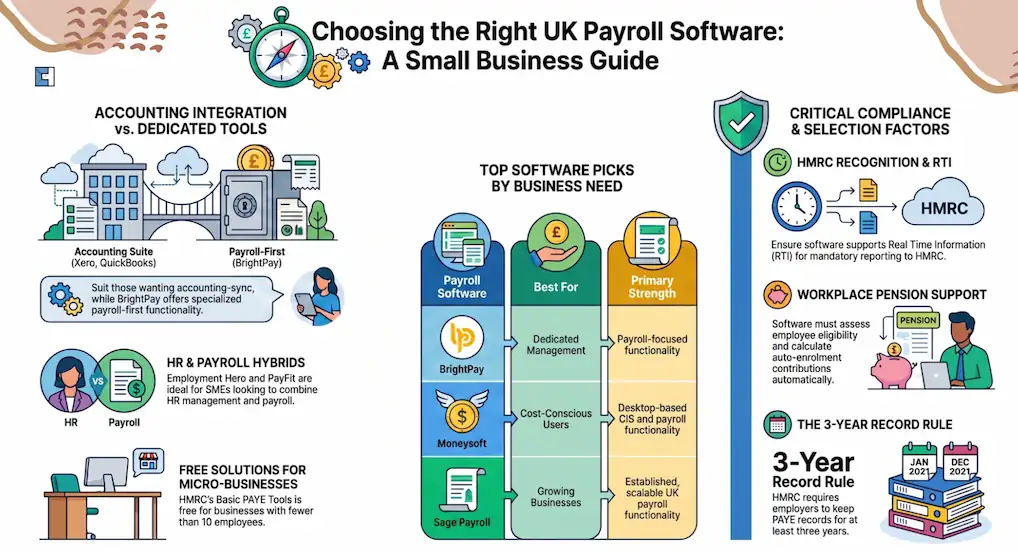
We have assessed payroll software based on factors important to UK small businesses, including HMRC recognition, RTI reporting, pension support, pricing, scalability, integrations, CIS functionality, and ease of use. The right choice depends on each business’s payroll needs, size, and existing systems.
Features and pricing checked September 2026. Businesses should confirm current pricing and features directly with providers before purchasing.
| Payroll Software | Best For | Pricing Model | Employee Limit / Scalability | Accounting Subscription Required? | Pension Integration / Support | CIS Support | Main Limitation |
| QuickBooks Payroll | Businesses already using QuickBooks | Monthly subscription with employee charges | Scalable | Yes, best with QuickBooks accounting | Yes | Limited | Costs increase as employee numbers grow |
| Xero Payroll | Xero accounting users | Payroll add-on/subscription model | Scalable | Yes | Yes | Available through integrations | Requires Xero accounting subscription |
| BrightPay | Dedicated payroll management | Annual licence/subscription | Scalable | No | Yes | Yes | Does not include full accounting features |
| Moneysoft Payroll Manager | Budget-conscious desktop users | Annual licence | Licence dependent | No | Yes | Yes | Windows desktop only |
| FreeAgent Payroll | Small businesses using FreeAgent | Included with relevant plans | Small teams | Yes | Yes | Limited | Less suitable for complex payroll |
| Sage Payroll | Growing businesses | Subscription model | Scalable | No | Yes | Yes | Higher costs for advanced requirements |
| Clear Books Payroll | Small businesses wanting accounting + payroll | Cloud subscription | Suitable for small teams | No | Yes | Limited | Fewer advanced payroll features |
| Employment Hero | Payroll + HR users | Free payroll and paid HR plans | Scalable | No | Yes | Limited | Advanced HR features require paid plans |
| PayFit | Businesses wanting payroll automation | Subscription pricing | Scalable | No | Yes | No | Higher cost compared with basic payroll tools |
Best UK Payroll Software for Small Businesses
QuickBooks Payroll
QuickBooks Payroll is a suitable choice for businesses that want payroll and accounting information connected in one system. Its main advantage is reducing manual data entry by keeping payroll records linked with financial information.
Best for: Small businesses already using QuickBooks accounting software.
Key advantage:
- Direct connection with QuickBooks accounting
- Helps businesses manage payroll alongside bookkeeping tasks
- Suitable for businesses already using the QuickBooks ecosystem
Main limitation: QuickBooks Payroll may become more expensive as employee numbers increase because pricing can depend on payroll requirements and usage.
- Official source: QuickBooks Payroll UK
Xero Payroll
Xero Payroll is designed for businesses that want payroll management connected with their accounting platform. It works best for companies already using Xero because financial data and payroll processes can be managed within the same ecosystem.
Best for: Small businesses already using Xero accounting software.
Key advantage:
- Strong integration with Xero accounting
- Helps simplify payroll and financial management in one platform
- Suitable for businesses already using cloud accounting
Main limitation: Businesses need a Xero accounting subscription, making it less suitable for companies looking only for standalone payroll software.
- Official source: Xero Payroll UK
BrightPay
BrightPay focuses specifically on payroll rather than combining payroll with accounting. It is designed for employers and payroll professionals who need a dedicated payroll solution with strong payroll management features.
Best for: Businesses wanting dedicated payroll software.
Key advantage:
- Dedicated payroll-focused platform
- Suitable for businesses managing payroll independently from accounting
- Includes features designed for payroll processing and reporting
Main limitation: BrightPay does not provide full accounting functionality, so businesses may need separate accounting software.
Businesses looking for a desktop payroll alternative may consider Moneysoft Payroll Manager.
- Official source: BrightPay
Moneysoft Payroll Manager
Moneysoft Payroll Manager is a Windows-based payroll solution designed for businesses and payroll professionals that prefer a straightforward desktop program instead of a cloud subscription model.
Best for: Small businesses looking for affordable desktop payroll software.
Key advantage:
- Affordable annual licence model
- Suitable for businesses wanting simple payroll management
- Popular with smaller employers and accountants
Main limitation: Moneysoft is desktop-based, so businesses requiring cloud access and remote collaboration may prefer another solution.
- Official source: Moneysoft Payroll Manager
FreeAgent Payroll
FreeAgent Payroll works well for businesses that want payroll combined with accounting, invoicing, and expense management. It is most suitable for smaller businesses with straightforward payroll needs.
Best for: Small businesses and freelancers already using FreeAgent accounting.
Key advantage:
- Payroll connected with FreeAgent accounting
- Useful for businesses already managing finances through FreeAgent
- Combines accounting and payroll tools in one platform
Main limitation: FreeAgent may not be suitable for businesses with complex payroll structures or advanced payroll requirements.
- Official source: FreeAgent Payroll
Sage Payroll
Sage Payroll is designed for businesses that want a recognised payroll platform with long-term payroll management capabilities. It is commonly used by businesses that need structured payroll processing and reporting.
Best for: Growing small businesses that need established payroll software.
Key advantage:
- Established payroll provider in the UK market
- Suitable for businesses that need reliable payroll management
- Supports growing business requirements
Main limitation: Sage offers multiple payroll products, so businesses need to compare plans carefully before choosing the right option.
- Official source: Sage Payroll UK
Clear Books Payroll
Clear Books Payroll is designed for smaller businesses that want payroll and accounting tools connected in one cloud platform.
Best for: Small businesses wanting simple cloud payroll with accounting features.
Key advantage:
- Combines accounting and payroll features
- Suitable for small businesses wanting a simple cloud solution
- Helps keep financial information organised
Main limitation: Clear Books may not provide the advanced payroll features available from specialist payroll providers.
- Official source: Clear Books Payroll
Employment Hero
Employment Hero combines payroll with wider HR functionality, making it suitable for businesses that want employee management tools alongside payroll processing.
Best for: Businesses looking for payroll combined with HR management.
Key advantage:
- Combines payroll and HR features
- Supports employee management processes
- Suitable for businesses wanting wider workforce tools
Employment Hero also provides a free payroll option for eligible businesses. The free plan focuses on essential payroll functions, while advanced HR features and additional workforce tools may require paid plans.
Main limitation: Businesses only looking for simple payroll software may find the additional HR features unnecessary.
- Official source: Employment Hero UK
PayFit
PayFit is designed for businesses that want payroll automation combined with HR management features. It focuses on reducing manual payroll administration through cloud-based tools.
Best for: SMEs wanting automated payroll and HR features.
Key advantage:
- Automation-focused payroll platform
- Combines payroll with HR features
- Suitable for businesses wanting streamlined processes
Main limitation: PayFit may be more expensive than basic payroll solutions because it includes automation and HR functionality.
- Official source: PayFit UK
Best Free and Low-Cost Payroll Software for Small Businesses
Small businesses with simple payroll requirements may not need a premium payroll platform. HMRC also provides recognised payroll software options, including free solutions for smaller employers.
Businesses should consider employee numbers, pension responsibilities and required features before choosing free payroll software.
Employment Hero Free Payroll
Employment Hero provides a free payroll option for eligible businesses that need basic payroll processing.
Best for: Small businesses wanting cloud payroll without paying for a complete HR platform.
Key advantage:
- Provides essential payroll functionality without the cost of a complete HR platform.
- Suitable for small businesses that need simple cloud-based payroll management.
Important limitation: Advanced HR features such as employee management workflows, onboarding tools, and additional workforce features may require paid plans.
- Official source: Employment Hero UK
12 Cloud Payroll
Best for: Small businesses looking for an online payroll solution with HMRC reporting support.
Key advantage:
- Provides cloud-based payroll management for UK employers.
- Suitable for businesses that want online access rather than desktop-only software.
Important limitation:
Businesses should compare pricing, employee limits, and pension functionality before selecting this option.
- Official source: 12 Cloud Payroll
HMRC Basic PAYE Tools
HMRC Basic PAYE Tools is free payroll software provided by HMRC for eligible small employers.
Best for: Micro-businesses with fewer than 10 employees and straightforward payroll needs.
Key features:
- Calculates employee tax and National Insurance
- Records employee payroll information
- Creates RTI submissions
- Sends Full Payment Submissions (FPS)
- Generates payslips and P60 forms
- Helps calculate statutory payments
Important limitation:
Basic PAYE Tools does not manage workplace pension auto-enrolment. It cannot assess employee pension eligibility, calculate required pension contributions, or send pension information to providers.
Employers using this software must manage pension responsibilities separately.
Other HMRC Recognised Free Payroll Options
Other free payroll solutions are available for eligible small employers, including:
Stansoft Linux Payroll Software
Stansoft Linux is included on HMRC’s list of recognised free payroll software for businesses with fewer than 10 employees.
It provides a Linux-based option for smaller employers requiring PAYE payroll and RTI reporting.
Best for: Micro-businesses looking for a Linux-based payroll option.
Enrolpay – Small Payroll
Small Payroll is included on HMRC’s recognised free payroll software list for businesses with fewer than 10 employees.
Employers should check its current functionality against their RTI, pension and wider payroll requirements before choosing it.
Best for: Smaller employers looking for an HMRC-recognised free payroll option.
Primo Payroll
Primo Payroll is also included on HMRC’s recognised free payroll software list for businesses with fewer than 10 employees.
Businesses should compare its available functionality with their employee numbers, reporting requirements and workplace pension arrangements.
Best for: Micro-businesses comparing free HMRC-recognised payroll products.
With these options, businesses should choose payroll software based on their employee count, HMRC reporting requirements, workplace pension responsibilities, required features, and budget.
Things to Consider When Choosing Payroll Software
Choosing payroll software is not only about price. Businesses should consider whether the software fits their current needs and future growth.
Understand Your Payroll Requirements
Before choosing software, consider:
- Number of employees
- Pay frequency
- Payroll complexity
- Statutory payments
- Workplace pensions
- CIS requirements
- Future business growth
A business with five employees may need very different features compared with a company planning to hire dozens of staff.
Check HMRC Recognition
HMRC recognition confirms that software can support required PAYE reporting processes.
However, HMRC does not recommend one payroll provider over another. Businesses should compare features, pricing and suitability before choosing software.
Check Workplace Pension Support
If your business has automatic-enrolment responsibilities, check whether the software can:
- Assess employee eligibility
- Calculate pension contributions
- Generate pension documents
- Establish pension links
Not all payroll services provide pension administration.
Consider Benefits in Kind Support
Companies offering taxable benefits to employees need to determine if the payroll software being used can meet all reporting obligations.
Real-time Payroll requirements from April 2027 will be extended for some of the benefits in kind, such as car benefit, fuel benefit, and medical benefit.
Review Data Security
Information contained in payroll includes:
- Personal data
- Salary data
- Tax information
- Banking information
A business should include:
- Login control measures
- Data protection facilities
- Backup solutions
- Security updates
Consider Switching and Data Migration
When moving payroll software, businesses should carefully transfer:
- Employee information
- Year-to-date payroll figures
- Tax codes
- Payroll IDs
- Previous payroll records
Incorrect migration can create reporting issues with HMRC.
Compare Total Costs
Do not only compare advertised prices.
Consider:
- Employee charges
- Additional users
- Payroll support
- HR features
- Software upgrades
- Integration costs
A cheaper option may become more expensive as your business grows.
Missing a payroll deadline or sending wrong reports can trigger unexpected penalties.
- Read our guide: Payroll RTI Penalties: A Complete Overview
Should You Run Payroll Yourself or Use a Payroll Service?
Payroll software can automate many important tasks, but employers remain responsible for paying employees correctly, submitting accurate information to HMRC and maintaining proper payroll records.
Small businesses may choose to manage payroll themselves if they have a simple payroll structure and enough time to handle:
- Employee payments
- PAYE calculations
- National Insurance deductions
- RTI submissions
- Workplace pension responsibilities
- Payroll records
However, as a business grows, payroll can become more complex. Businesses with multiple employees, changing pay structures, benefits, pensions or compliance requirements may benefit from professional payroll support.
If managing payroll software, HMRC submissions, and compliance requirements is becoming time-consuming, explore our Specialised Payroll Accountants for Businesses in the UK service to handle your payroll process efficiently.
Finding it tricky to figure out payroll deductions, tax, and statutory payments?
- Read our guide: Understanding Payroll Deductions in the UK
Conclusion
Choosing the best payroll software for your small business depends on your employee numbers, budget, accounting setup, and payroll requirements.
Businesses already using accounting platforms may prefer solutions such as QuickBooks Payroll, Xero Payroll or FreeAgent because they connect payroll with existing financial records.
Employers looking for dedicated payroll management may find BrightPay or Moneysoft more suitable, while businesses wanting payroll combined with HR features may prefer platforms such as Employment Hero or PayFit.
Before choosing payroll software, businesses should compare:
- Pricing structure
- Employee limits
- HMRC compliance features
- RTI reporting support
- Workplace pension functionality
- Accounting integrations
- Scalability for future growth
The right payroll software should not only simplify current payroll tasks but also support your business as it develops.
FAQs
How much does payroll software cost for small businesses?
Payroll software costs depend on the provider and the features you need. Some payroll software is provided at no cost, like the HMRC Basic PAYE Tools software, to eligible small business customers with fewer than 10 employees, while paid solutions usually charge monthly subscriptions, annual licences or employee-based fees.
What is the cheapest payroll software for small businesses?
The HMRC Basic PAYE Tools payroll software is free for small businesses with fewer than 10 employees. Other inexpensive options include desktop-based payroll software like Moneysoft Payroll Manager. Businesses should assess the features of payroll software because cheaper software may not include pension automation or advanced payroll tools.
How many employees can payroll software support?
Employee limits vary depending on the provider and plan. Some payroll software is designed for micro-businesses, while others can support growing companies with larger teams. Businesses should check employee limits before selecting a solution.
Does payroll software manage workplace pensions?
Many paid payroll systems support workplace pension tasks, including employee assessment and contribution calculations. However, features vary between providers. Free tools such as HMRC Basic PAYE Tools do not manage automatic pension enrolment responsibilities.
Can I switch payroll software during the tax year?
Yes, businesses can switch payroll software during the tax year, but payroll data must be transferred carefully. Employers should ensure employee records, tax information, year-to-date figures and Payroll IDs are migrated correctly.
Do I need an accountant to run payroll?
No, businesses can manage payroll themselves using suitable software. However, employers remain responsible for accurate calculations, HMRC submissions, employee payments and compliance requirements. Businesses that lack time or payroll experience may choose professional payroll support to reduce administration and compliance risks.